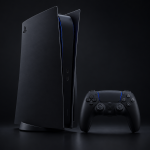
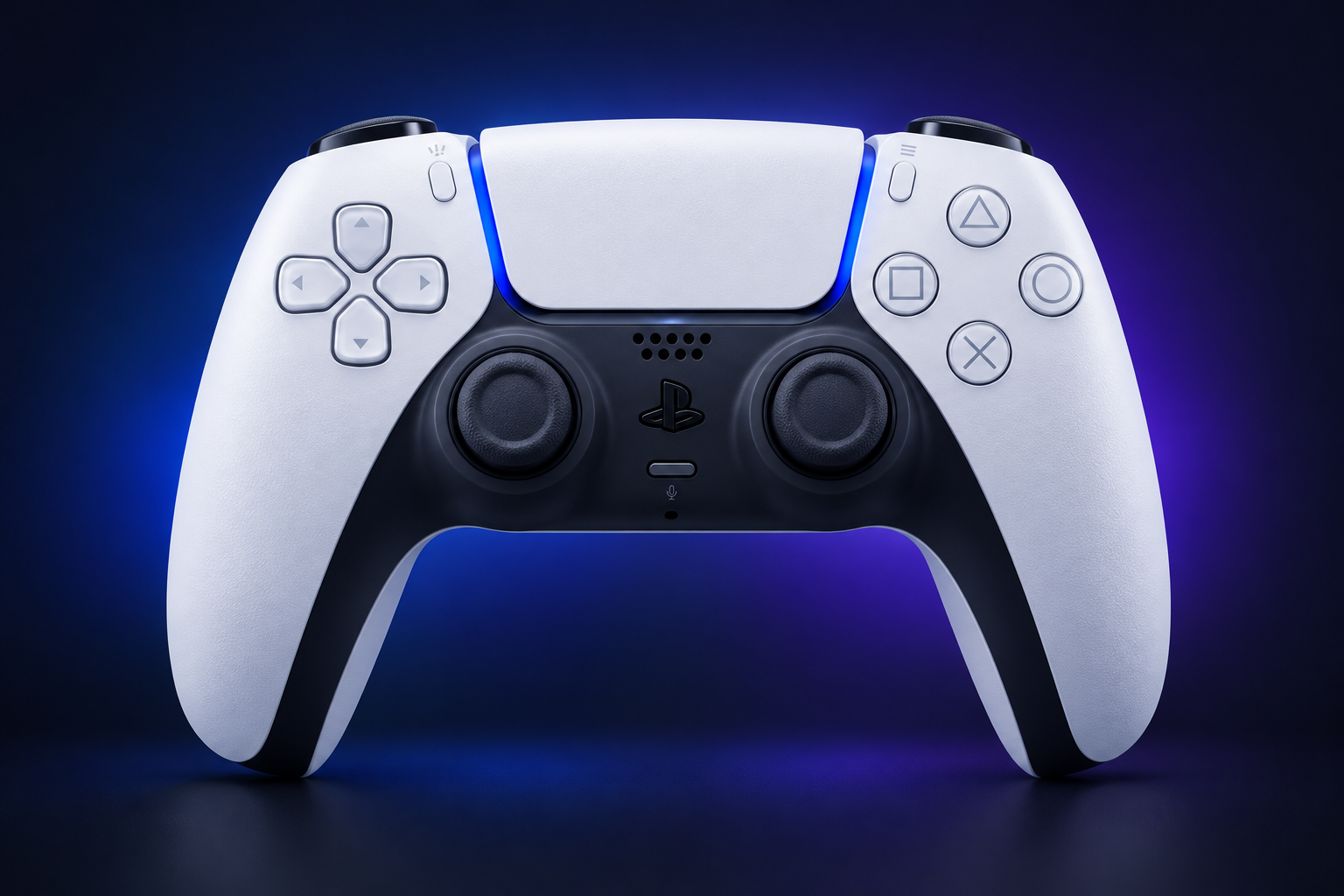
For most players, the right PS5 controller is the standard DualSense Wireless Controller. It ships with every PS5, PS5 Slim and PS5 Pro, and it is the only Sony pad that unlocks haptic feedback and adaptive triggers in PS5 games. We cover where the DualSense Edge and the Access controller make more sense, and we walk through setup, settings, battery care, compatibility and fixes.
Which PS5 controller should you buy?
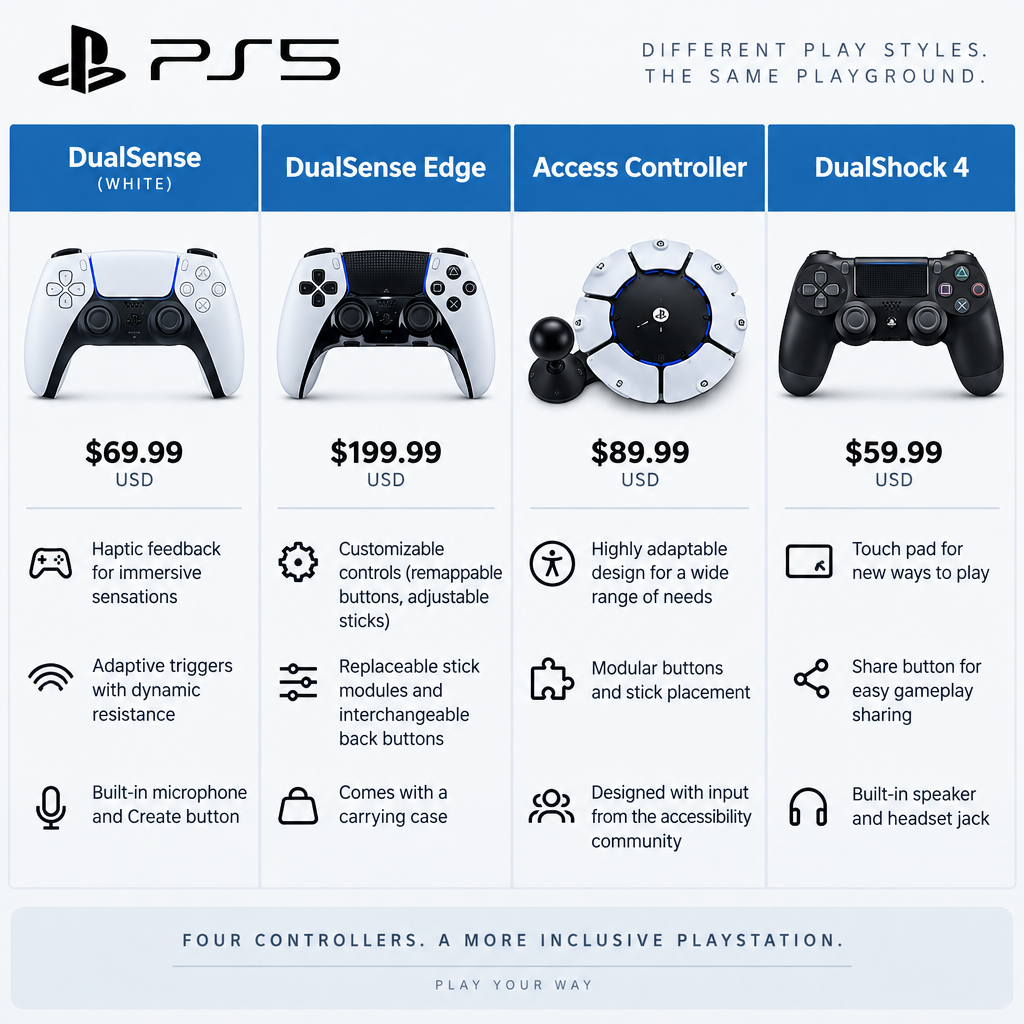
Sony currently sells three first-party PlayStation controllers for PS5: the standard DualSense, the premium DualSense Edge and the Access controller for players with disabilities. Licensed third-party pads fill the gaps around them. The older DualShock 4 also works on PS5, but only for PS4 games. The table below lists US launch prices, because Sony has adjusted console and accessory pricing in several regions since 2020, and current shelf prices differ by country and retailer.
| Controller | US launch price | Launched | Best for | Key extras |
|---|---|---|---|---|
| DualSense (white) | $69.99 | November 2020 | Almost everyone | Haptics, adaptive triggers, mic, speaker |
| DualSense (colors) | $74.99 | From mid-2021 | Style without paying Edge money | Same hardware, different shell |
| DualSense Edge | $199.99 | January 26, 2023 | Competitive and long-session players | Back buttons, swappable sticks, profiles |
| Access controller | $89.99 | December 6, 2023 | Players who need an adaptable layout | Modular buttons, switch ports, profiles |
| DualShock 4 | PS4-era | 2013 | PS4 games on PS5 only | No support for PS5 games |
| Licensed third-party | Varies | Varies | Fight sticks, pro-style pads | Feature support varies by model |
Our position is simple. Buy a second standard DualSense if you need another pad for local play or as a charging spare. Buy the Edge only if you will actually use the back paddles and profiles, and if you can live with its shorter battery life. Buy the Access controller if the standard layout causes pain, fatigue or reach problems, because nothing else in Sony’s lineup comes close to it for adaptability.
What the DualSense actually is
The DualSense Wireless Controller launched alongside the PS5 on November 12, 2020 in North America, Japan and several other markets, and on November 19, 2020 in the UK and most of Europe. The model number is CFI-ZCT1, followed by a regional and color suffix. Every PS5 console sold since then includes one in the box, from the original launch model through the PS5 Slim (late 2023) and the PS5 Pro (November 7, 2024).
The headline specs come straight from Sony’s published hardware details:
| Spec | DualSense |
|---|---|
| Dimensions | Approx. 160 × 66 × 106 mm |
| Weight | Approx. 280 g |
| Wireless | Bluetooth 5.1 |
| Wired port | USB Type-C |
| Battery | Built-in lithium-ion, 3.65V, 1,560 mAh |
| Audio | Built-in mic array, built-in speaker, 3.5mm headset jack |
| Motion | Six-axis sensing (three-axis gyroscope, three-axis accelerometer) |
| Feedback | Haptic feedback, adaptive triggers (L2/R2) |
| Other inputs | Touchpad with click, Create button, mute button |
At 280 g it is noticeably heavier than the DualShock 4, which weighed about 210 g. The extra mass comes from a bigger battery, larger grips and the motors behind the triggers. We find the longer grips more comfortable in multi-hour sessions than the DualShock 4’s stubby handles, though players with small hands sometimes say the opposite.
The buttons that changed from PS4
The Share button is gone. In its place sits the Create button, which opens the PS5’s capture menu for screenshots, video clips and broadcasts. The Options button keeps its spot on the right of the touchpad. Below the PS button you will find a small mute button that toggles the built-in microphone and glows orange when the mic is muted. The light bar now traces the edges of the touchpad instead of sitting on top of the controller, and a row of small player indicator LEDs sits beneath the touchpad.
Hardware revisions
Sony has quietly revised the DualSense’s internals several times since 2020. You can usually identify a revision by the BDM code printed on the internal board, which people reach through teardowns rather than from the box. Community testing and teardown reports suggest later revisions draw less power and run longer on a charge. Sony has not published official battery figures for any revision, so treat those comparisons as community data, not a spec. Every revision behaves identically on the console side: same features, same pairing process, same compatibility.
Haptic feedback and adaptive triggers: why the DualSense feels different
The two features that set the DualSense apart from every older PlayStation controller are haptic feedback and adaptive triggers. They are also why a PS5 game requires a DualSense or a licensed equivalent rather than a DualShock 4.
Haptic feedback
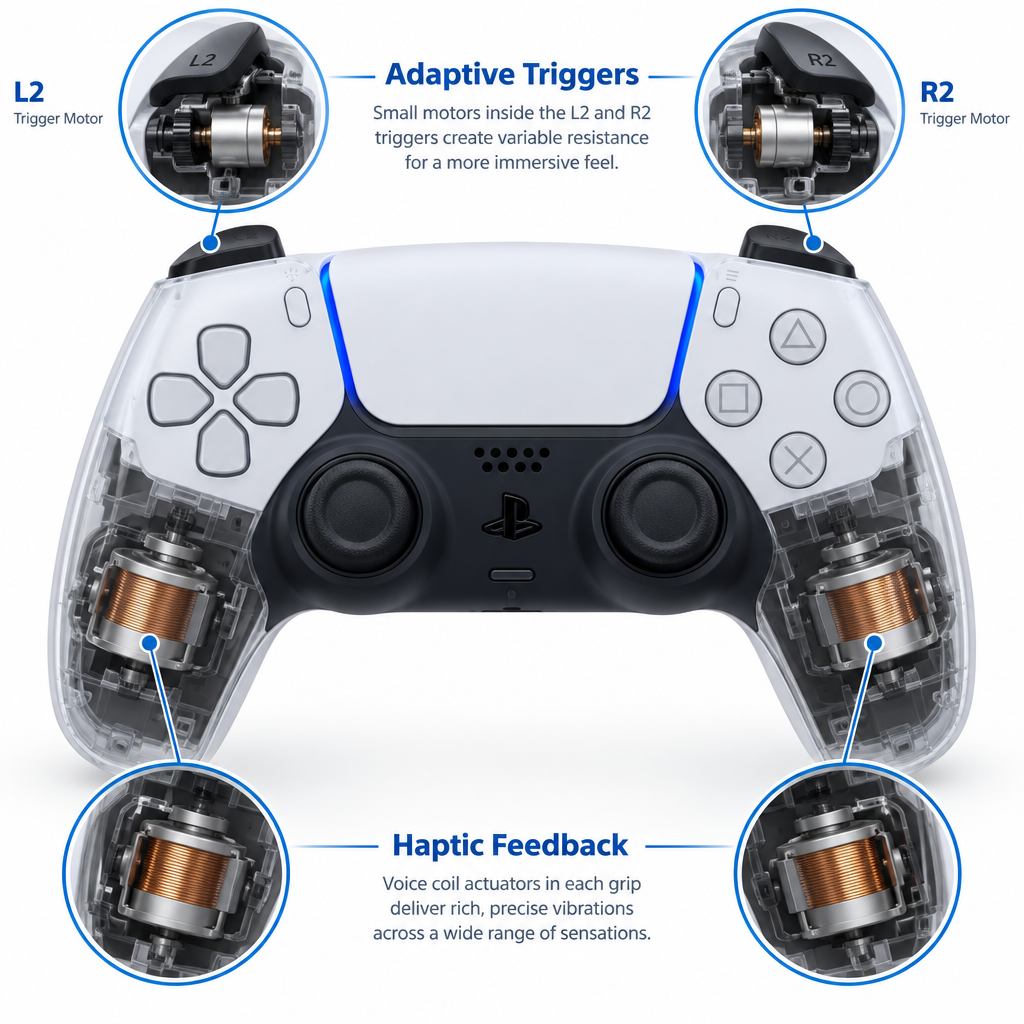
Older pads used offset-weight rumble motors that could only spin faster or slower. The DualSense uses voice coil actuators, which work more like small speakers that vibrate across a wide frequency range. Developers can therefore produce sharp taps, soft patters, textured surfaces and directional effects instead of one generic buzz.
The best showcase is still Astro’s Playroom, which comes preinstalled on PS5 consoles and was designed to demonstrate the controller. Walking on sand, metal, ice and grass each produces a distinct texture in your palms, and rain lands as fine, scattered taps. Astro Bot, released in September 2024 and named Game of the Year at The Game Awards 2024, pushes the same idea further. Returnal also uses haptics to make individual raindrops land around your hands.
Adaptive triggers
Inside L2 and R2 sit small motors that can add resistance, create a click point partway through the pull or push back against your finger. Developers program these per weapon, vehicle or action.
A few examples show how much range there is:
- Ratchet & Clank: Rift Apart uses a half-pull and full-pull on R2 for different weapon fire modes.
- Returnal splits L2 so a half press aims and a full press triggers alt-fire.
- Gran Turismo 7 uses the trigger to communicate braking feedback.
- Astro Bot and Astro’s Playroom use trigger tension for springs, bows and other gadgets.
Not every game uses these features well, and some players find heavy trigger resistance tiring in shooters. You can dial both effects down or switch them off system-wide, as we cover in the settings section below. Games can also include their own options, which override or sit alongside the system settings depending on the title.
What PS4 games do on the DualSense
PS4 games played on a PS5 work fine with the DualSense, but they do not gain true haptics or adaptive triggers. The console translates the old rumble signals into vibration through the haptic actuators, which feels close to a DualShock 4. Only a handful of PS4 games received PS5 upgrades that added DualSense features, and in those cases you are actually running the PS5 version.
Colors, collections and limited editions
Sony launched the DualSense in white with black accents, then started adding colors in 2021. The hardware inside every standard color is identical, so your choice is purely cosmetic. In the US, color variants launched at $74.99, a $5 premium over the white model.
Standard color range
The standard colors released so far fall into a few groups:
- Midnight Black and Cosmic Red arrived in mid-2021 as the first alternatives to white.
- Starlight Blue, Galactic Purple and Nova Pink followed in early 2022, rounding out what Sony called the galaxy-inspired range.
- Gray Camouflage brought a camo pattern to the shell.
- Volcanic Red, Cobalt Blue and Sterling Silver formed the Deep Earth collection, with a metallic finish.
- Chroma Indigo, Chroma Pearl and Chroma Teal introduced a translucent, color-shifting look in 2025.
Availability rotates. Some colors stay in production for years while others fade from shelves, and regional stores do not always carry the full range at once. We have not seen Sony publish a definitive list of which colors are still in production in each region, so checking PlayStation Direct or a major retailer is the reliable way to see what you can buy today.
Limited edition DualSense controllers
Limited editions are where Sony gets more adventurous with paint and materials. These usually tie into a first-party game or a PlayStation milestone, launch close to the matching release, and cost more than standard colors. Past examples include:
| Limited edition | Tie-in | Launch timing |
|---|---|---|
| God of War Ragnarök | Game launch | November 2022 |
| Marvel’s Spider-Man 2 | Game launch | 2023 |
| Astro Bot | Game launch | September 2024 |
| 30th Anniversary | PlayStation’s 30th birthday, PS1 gray design | November 2024 |
| Death Stranding 2 | Game launch | 2025 |
The 30th Anniversary edition borrowed the gray palette and colored logo of the original PlayStation and sold out quickly in many regions. Sony also lists a LISA Limited Edition DualSense on its own controller pages, a collaboration with the Blackpink member. We could not verify a confirmed price or release date for every region at the time of writing, so check PlayStation’s official store before assuming availability.
Heads up
Limited editions attract counterfeit listings on marketplaces. Buy from PlayStation Direct or a recognised retailer, and be wary of “new” limited pads priced well below the original retail price.
Function-wise, a limited edition DualSense is the same controller as a standard one. You are paying for the design, the scarcity and sometimes custom packaging, not for better sticks or a bigger battery.
DualSense Edge: Sony’s pro controller
The DualSense Edge launched on January 26, 2023 at $199.99 in the US, £209.99 in the UK and €239.99 in the eurozone. It keeps everything the standard DualSense does, including haptics and adaptive triggers, then adds the customisation that competitive players were previously buying from third parties.
What the Edge adds
- Two rear buttons, swappable between half-dome and lever styles, which you can map to almost any input.
- Trigger stops on L2 and R2, a three-position slider per trigger that shortens travel for faster shots.
- Replaceable stick modules. You pop off the faceplate, flip a release lever and swap the entire analog stick unit. Replacement modules launched at $19.99 each.
- Swappable stick caps in standard, high-dome and low-dome shapes.
- Function (Fn) buttons beneath the analog sticks that let you switch between saved profiles mid-game and adjust audio on the fly.
- Profiles with remapping, stick sensitivity curves, stick dead zones and trigger dead zones, all saved on the controller.
- A hard carrying case with a slot that lets you charge the controller while it is stored.
- A braided USB-C cable and a connector housing that locks the cable into the controller to stop accidental disconnects.
The Edge weighs about 325 g, so it feels heavier again than the standard DualSense.
The Edge’s weak spot: battery life
The Edge’s battery is smaller than the standard DualSense’s, widely reported at 1,050 mAh from teardowns, and reviewers consistently found that it runs out sooner. In our experience you need to plug it in more often, especially with haptics and trigger effects at full strength. The braided cable and locking housing help if you play tethered, which is how many competitive players use it anyway.
Who should buy it
The Edge earns its price if you play shooters, fighting games or racing games seriously, if you want back buttons without third-party compromises, or if stick drift has killed controllers for you before, because a $19.99 module swap is cheaper than a new pad. It is a poor buy if you mostly play single-player adventures on the couch and dislike charging often. In that case a standard DualSense and a spare is the smarter spend.
Access controller: built for accessibility
The Access controller launched on December 6, 2023 at $89.99 in the US, £79.99 in the UK and €89.99 in the eurozone. Sony developed it with input from accessibility experts and community groups, and it looks nothing like a traditional gamepad. It is a circular, flat unit designed to lie on a table, a wheelchair tray or a mount, and it can be operated from any angle.
How it works
The controller has a central stick plus eight buttons arranged around it, and each button accepts different swappable caps of varying shapes and sizes. Every button can be remapped to any PS5 input. Players can lay out the controller however suits their range of motion, then save the configuration as a profile.
Four 3.5mm AUX ports on the edge let you plug in external assistive switches, buttons, triggers and joysticks from other manufacturers. This is a major practical benefit: if you already own adaptive switches, you can bring them into your PS5 setup.
Combining controllers
The PS5 can combine up to two Access controllers with one DualSense and treat them as a single virtual controller. This allows split layouts across two hands or shared play, where a helper uses a DualSense while the main player uses an Access controller. Setup lives under the Accessibility menu in Settings, under the Access controller options, and the console walks you through a guided layout on first use.
Who it is for
The Access controller is for players whose physical needs make the standard DualSense uncomfortable or impossible to use for long, including people with limited grip strength, limited reach or the ability to use only one hand. It also supports PS5 accessibility features such as custom button assignments.
PS5 controller compatibility: consoles, PC, phones and more
Compatibility is the most searched topic around the DualSense, and the answers depend on the device.
PS5, PS5 Slim and PS5 Pro
Every DualSense, DualSense Edge and Access controller works with every PS5 model, including the Digital Edition, the Slim and the Pro. No model has exclusive controller features. If you upgrade consoles, your existing pads carry over without any changes.
PS4
The DualSense is not supported on PS4 consoles. Sony never added official support, so plan on DualShock 4 controllers if you still play on a PS4.
The reverse is partly true: the DualShock 4 works on a PS5, but only for PS4 games, plus system menus and Remote Play. The PS5 blocks DualShock 4 input in PS5 games. If a family member wants to play a PS5 game, they need a DualSense or a licensed PS5 controller.
PC
Windows recognises the DualSense over USB and Bluetooth. Steam has built-in support through Steam Input, so most games in your Steam library work with full button mapping, gyro and touchpad options. Native support is strongest in PlayStation Studios PC ports, many of which support haptics and adaptive triggers. Those advanced features generally require a wired USB connection on PC, and wireless support depends on the game.
Sony offers a Windows app, now called PlayStation Accessories, to update DualSense and DualSense Edge firmware from a PC. This matters for PC-only players, who otherwise would have no way to install controller updates without a PS5.
Mac, iPhone, iPad and Apple TV
Apple added DualSense support in macOS Big Sur 11.3, iOS 14.5, iPadOS 14.5 and tvOS 14.5. Pair it through the device’s Bluetooth settings like any other wireless accessory. Games that support MFi controllers will recognise it, and Remote Play on an iPhone or iPad works well with it.
Android
Android 12 and later support the DualSense natively. Older Android versions may connect but with incorrect button mapping. Behavior can also differ between phone makers, so test your setup before relying on it on a trip.
PlayStation Portal and Remote Play
The PlayStation Portal Remote Player builds the DualSense’s haptics and adaptive triggers into its own handles, so you get those features while streaming from your PS5. A separate DualSense can also be used for Remote Play on phones, tablets and PCs, which is how many of us play while the TV is in use.
Next-gen compatibility
Sony has not confirmed whether the DualSense will carry forward to its next console, although it carried DualShock 4 support into the PS5 for PS4 games. Our “playstation 6” roundup tracks what has been reported so far, and we would treat any claim about PS6 controllers as unconfirmed until Sony announces it.
How to pair a DualSense with your PS5
The first controller pairs automatically when you connect it with a USB cable. Additional controllers can pair wirelessly.
Quick steps: pair a DualSense with a PS5
- Connect the controller to the PS5 with a USB-C cable.
- Press the PS button and wait for the light bar to glow.
- Unplug the cable once the controller is recognised.
- For a wireless pair, go to Settings > Accessories > General > Bluetooth Accessories.
- On the new controller, hold Create and PS until the light bar flashes.
- Select the controller from the list on screen.
Pairing over USB
A wired pair is the most reliable option, especially for a brand-new controller or one that was previously paired to a PC or phone. Connect the cable to a USB port on the PS5, press the PS button and the console registers the pad. The standalone DualSense does not come with a USB cable in the box; console bundles and the DualSense Edge do. A spare USB-C cable is therefore worth adding to any controller purchase.
Pairing wirelessly
Wireless pairing works well for a second controller while you are already signed in with the first. Open Settings > Accessories > General > Bluetooth Accessories. Hold the Create button and the PS button together on the new controller until the light bar flashes, then select it from the list. If you want to use the same DualSense with a phone and then return to the PS5, a quick USB reconnect usually re-registers it with the console.
Assigning a user
Each controller signs in to a user profile on the PS5. When you press the PS button on a newly connected pad, the console asks who is using it. Switch users from the Control Center if a family member picks up the wrong pad.
PS5 controller settings worth changing
The default settings suit most people, but a few changes make a real difference to comfort, battery life and latency. Menu labels have shifted slightly across PS5 firmware updates, so if a name does not match exactly, look under the same Accessories or System section.
Vibration and trigger intensity
Go to Settings > Accessories > Controllers. Here you will find Vibration Intensity and Trigger Effect Intensity, each with options from Off through Strong. Lowering both saves noticeable battery and reduces hand fatigue in long shooter sessions. We run trigger effects at Medium in competitive games and Strong in single-player showcases like Astro Bot.
Controller speaker volume and light brightness
The same menu includes Controller Speaker Volume and Brightness of Controller Indicators. Dimming the light bar and turning down the speaker both chip away at power drain. Some games use the light bar for gameplay cues, so check before switching it to its dimmest setting.
Communication method (USB versus Bluetooth)
The Controllers menu also includes a Communication Method option. Choose Use USB Cable to send controller data over the cable when plugged in instead of over Bluetooth. Competitive players use this to reduce input latency. Leave it on Bluetooth if you only plug in to charge.
Player tip
Set Communication Method to “Use USB Cable” before an online session in a fighting game or shooter, then plug in with a decent USB-C cable. You trade the wireless freedom for a more consistent connection.
Auto power-off timer
Go to Settings > System > Power Saving > Set Time Until Controllers Turn Off. Setting this to 10 or 30 minutes prevents a forgotten controller from draining while a movie plays. You can also turn a controller off manually by opening the Control Center with a short PS button press, selecting Accessories, choosing the controller and selecting Turn Off.
Custom button assignments
Go to Settings > Accessibility > Controllers > Custom Button Assignments to remap buttons system-wide. This is useful if a game lacks remapping or if you want, for example, to swap Cross and Circle. Remember that system-level remaps apply in every game until you switch them off, which confuses people when they forget they set one up.
Battery life and charging
Sony does not publish an official battery-life rating for the DualSense, and real-world figures vary widely with the game, haptic intensity, trigger effects, light bar brightness and speaker use. Heavy haptics and trigger use drain it fastest. Reviewers have generally reported somewhere in the high single digits of hours for typical use, with newer hardware revisions faring better according to community testing. We would not plan around any single number.
Charging in Rest Mode
The most convenient way to charge is in Rest Mode. Go to Settings > System > Power Saving > Features Available in Rest Mode > Supply Power to USB Ports and choose Always or 3 Hours. Plug the controller into the console, put the PS5 into Rest Mode and it charges while the console sleeps. With this set to Off, controllers will not charge when the console is in Rest Mode.
Charging station
Sony’s DualSense Charging Station launched at $29.99 and charges two controllers at once. Slide each pad onto the dock without fiddling with cables. It works with the standard DualSense; the Edge charges through its own cable or the carrying case. Licensed third-party docks exist too, though build quality varies.
Wall chargers and battery health
You can charge from a phone wall adapter or a PC port. Sony’s guidance for battery care centers on avoiding extreme heat and avoiding leaving the battery fully drained for long periods. Charge before storing a controller you will not use for weeks, rather than leaving it completely empty.
Firmware updates
Sony releases DualSense firmware updates to fix bugs and improve features. When an update is available, the PS5 notifies you, and you can also check manually under Settings > Accessories > Controllers > Wireless Controller Device Software. The console prompts you to connect the controller with a USB cable if the update requires a wired connection.
Keep the controller connected and do not unplug it until the update completes. Interrupting a firmware update is the most common way to leave a controller unresponsive. PC players can update through Sony’s PlayStation Accessories app on Windows.
Stick drift, repairs and warranty
Stick drift, where the camera or character moves without input, is the most common DualSense hardware complaint. The DualSense uses potentiometer-based analog sticks, and those components wear over time. Drift has been widely reported since launch, and a US class action over DualSense drift was filed in 2021.
What you can safely do
Before assuming hardware failure, try the following:
- Reset the controller. Find the small hole on the back of the controller near the L2 button. Press the button inside with a straightened paperclip or SIM tool for a few seconds, then reconnect with a USB cable and press the PS button.
- Update the firmware through the PS5 settings path above.
- Clean around the sticks. Gently use compressed air around the base of the sticks while moving them in circles to clear dust and debris.
- Check the game’s dead zone settings. Many games let you increase the stick dead zone, which masks mild drift.
Repair and warranty
If drift persists, contact PlayStation support. Warranty coverage depends on your region and where you bought the controller, so check the terms that apply in your country. Sony runs repair and replacement programs through its support sites. The DualSense Edge is the one Sony controller designed for user stick replacement through its swappable modules.
Heads up
Opening a standard DualSense to replace sticks yourself can void your warranty and requires soldering. Contact PlayStation support first while the controller is still covered.
Troubleshooting common PS5 controller problems
| Problem | Likely cause | Fix |
|---|---|---|
| Controller will not connect | Paired to another device, or software glitch | Reset via the back pinhole, then connect by USB and press PS |
| Light bar flashes then stops | Pairing failed or battery empty | Charge for a while, then pair over USB |
| Not charging in Rest Mode | USB power disabled in Rest Mode | Settings > System > Power Saving > Features Available in Rest Mode > Supply Power to USB Ports |
| Not charging from a cable | Charge-only or damaged cable, dirty port | Try another USB-C cable and port, check for lint in the port |
| Input lag or disconnects | Bluetooth interference, distance | Move closer, remove obstacles, or set Communication Method to Use USB Cable |
| Camera drifts | Worn or dirty stick | Clean, reset, raise in-game dead zone, then contact support |
| No haptics in a game | Game is a PS4 title, or setting disabled | Check Vibration Intensity in Settings and confirm you are running the PS5 version |
| Mic not working | Mute is on | Press the mute button, check that it is no longer orange |
| Wrong buttons do the wrong thing | System-wide remap active | Settings > Accessibility > Controllers > Custom Button Assignments, turn off |
| Controller not recognised on PC | Missing driver or app support | Use a USB cable, enable Steam Input, check the game supports PlayStation controllers |
Licensed third-party PS5 controllers
Not every PS5 controller comes from Sony. Officially licensed controllers carry PlayStation licensing on the box and work in PS5 games. Examples include the Victrix Pro BFG and the Nacon Revolution 5 Pro, both aimed at competitive players with modular layouts and back buttons, as well as fight sticks and racing wheels from established accessory makers.
Most third-party options do not replicate the DualSense’s haptic feedback and adaptive triggers, which are central features of the PS5 controller experience. They offer other benefits instead, like different stick technologies, alternative layouts and more extensive physical customisation.
Unlicensed controllers sold cheaply online are a gamble. Many only work in PS4 games on a PS5 because of the console’s restriction on non-DualSense controllers in PS5 titles, or they rely on workarounds that can stop working after a system update. We recommend checking for official licensing before buying any third-party pad.
Buying a PS5 controller: what to check
Buy direct or from major retailers
PlayStation Direct, Sony’s own store, sells controllers in supported regions with delivery straight from Sony. Major retailers also stock the full standard range and usually match Sony’s pricing. Limited editions often appear first through PlayStation Direct and sell out quickly. Signing up for PlayStation’s news and store notifications is the most reliable way to hear about upcoming drops.
Spot counterfeits
Fake DualSense controllers circulate on marketplaces. Warning signs include prices far below retail, packaging with typos or blurry printing, missing regulatory labels and controllers that do not show up as a DualSense in the PS5’s accessory menus. Genuine controllers should pair and update through the PS5 settings without issues.
What comes in the box
| Product | In the box |
|---|---|
| DualSense (standalone) | Controller, documentation, no USB cable |
| DualSense Edge | Controller, braided USB-C cable, carrying case, connector housing, extra stick caps, back buttons |
| Access controller | Controller, swappable button and stick caps, USB cable, tags for labeling |
The standalone DualSense skips the cable, so add one to your order if you do not have a spare USB-C cable already.
Hold off on hype buys
Sony occasionally discounts standard DualSense colors during seasonal sales, including Days of Play and Black Friday. A standard color is rarely worth buying at full price if a sale is weeks away, unless you need a replacement now.
FAQ
Does a PS5 controller work on a PS4?
No. The DualSense is not supported on PS4 consoles. Use a DualShock 4 with a PS4.
Can I use a DualShock 4 on a PS5?
Yes, but only for PS4 games, system menus and Remote Play. The PS5 blocks DualShock 4 input in PS5 games, so you need a DualSense or a licensed PS5 controller for those.
How long does the DualSense battery last?
Sony does not publish an official figure. Battery life depends heavily on haptic and trigger intensity, light bar brightness and speaker use. Lowering Vibration Intensity and Trigger Effect Intensity in Settings > Accessories > Controllers is the quickest way to extend it.
Is the DualSense Edge worth it?
It is worth it if you will use the back buttons, trigger stops and profiles, or if replaceable stick modules appeal to you after drift issues. For casual single-player play, a standard DualSense is better value, and the Edge’s shorter battery life is a real drawback.
Does the standalone DualSense come with a cable?
No. The standalone DualSense ships without a USB cable. PS5 console bundles include one, and the DualSense Edge includes a braided USB-C cable.
Can I use a PS5 controller on PC?
Yes, over USB or Bluetooth. Steam supports the DualSense through Steam Input, and many PlayStation PC ports support haptics and adaptive triggers, usually over a wired connection.
How do I fix PS5 controller drift?
Reset the controller using the pinhole on the back, update its firmware, clean around the sticks and increase the in-game dead zone. If drift continues, contact PlayStation support about warranty repair before opening the controller yourself.
Do PS5 Slim and PS5 Pro use a different controller?
No. Every PS5 model, including the Digital Edition, Slim and Pro, uses the same DualSense, and the Edge and Access controller work across all of them.